

The Orchestrator configuration interface in the AI Agent Platform allows you to customize how your AI Agent greets contacts, handles moments of silence, longer processing times, and how to handle security messages. These settings help create a smoother and more natural experience across supported channels.
You can access these controls directly in the AI Agent Platform, using the Settings button.
Table of Contents
Available Settings
Within the Orchestrator configuration panel, you can define the following.
Custom Welcome Message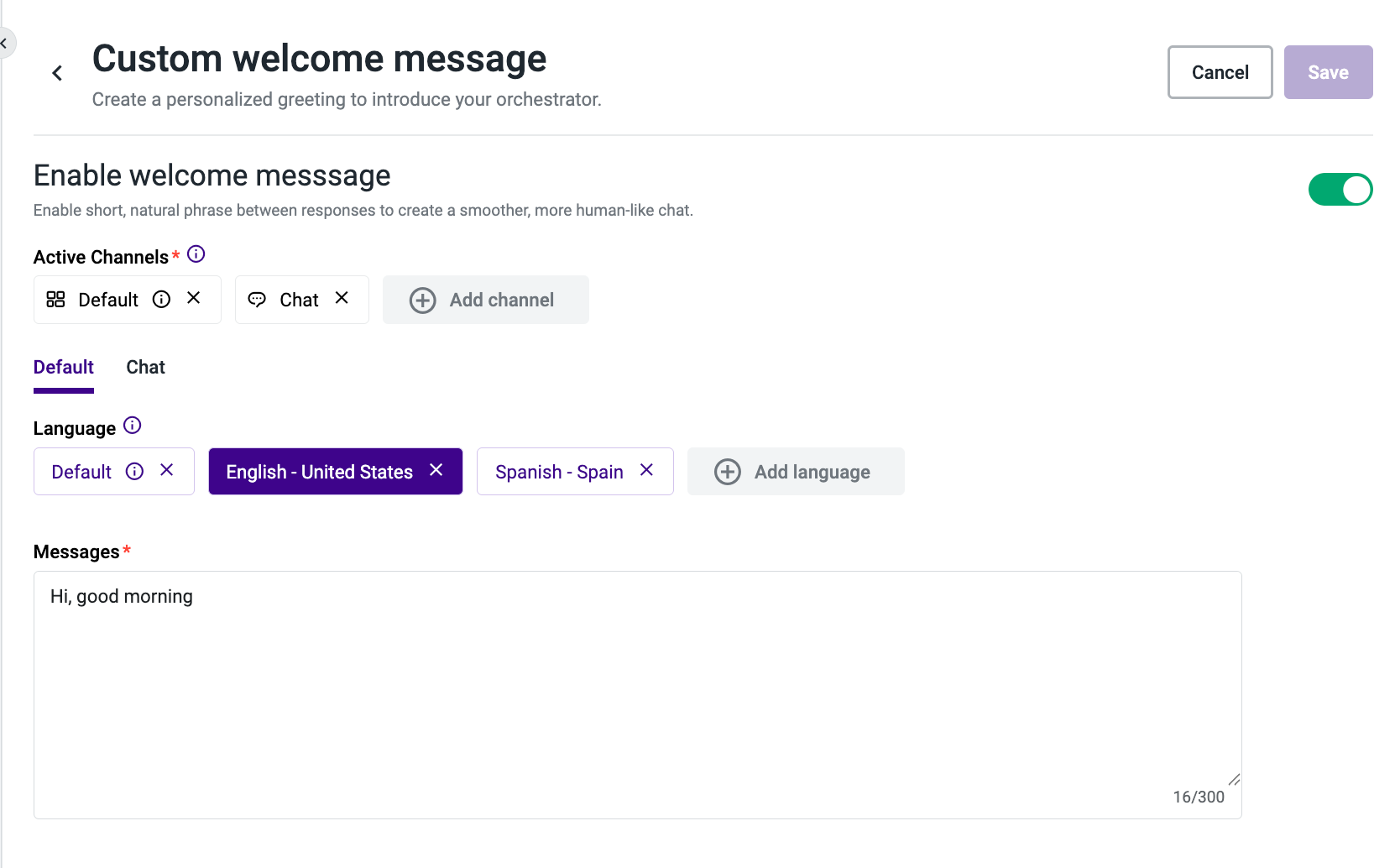
Create a personalized greeting that is sent at the start of every conversation. This setting applies to all AI Agent-supported channels, including Voice, Chat, Copilot, SMS, Email, Facebook Messenger, WhatsApp, Digital Connect, Fax, and Other.
This option is the best approach if you want to ensure that the welcome message is always the same. Although you can instruct the AI Agent to greet users through prompts, that method depends on the LLM and can vary. This welcome message feature does not rely on the LLM, which makes the message deterministic and generally faster than a generated greeting.
The Custom Welcome Message is disabled by default. When disabled, the Orchestrator generates a greeting based on the Agent instructions defined in the AI Agent Platform.
See more here for Custom Welcome Message.
Inactivity Message
Note: This feature is exclusively available for Agentic workflows and supports the Voice channel only for now.
The Inactivity Message feature manages conversational flow when a contact becomes silent or unresponsive during a voice call. After a configurable period of silence, the system automatically sends a follow-up message to re-engage the contact and prevent call abandonment.
The Inactivity Message is disabled by default.
- Message type: Choose between Repeat Last Message — which replays the last statement or question sent to the contact — or AI-Generated Message, which dynamically creates a new, context-aware response. If you select AI-Generated Message, you can optionally provide a custom prompt to guide the generated response.
See more here for Inactivity Message.
Conversation Fillers
Note: This feature is exclusively available for Agentic workflows and supports the Voice channel only for now.
Set up short, smart responses that keep the interaction active when the system needs more time to process an action. Fillers provide continuous feedback to the contact, helping maintain engagement while the Orchestrator completes a task — particularly during Workflow, API, or MCP calls. The feature must be manually enabled for each AI Agent individually.
Conversation Fillers are available in two modes:
Static Fillers: Admins define a pool of custom, predefined messages and control timing parameters. When a filler is needed, the AI Agent randomly selects one message from the available pool.
Dynamic Contextual Fillers: The system automatically generates context-aware filler messages without requiring any manual message authoring. When an AI Agent's response takes longer than expected, the system sends a contextually relevant message to the contact.
See more here for Conversation Fillers.
Key capabilities:
- Messages are generated in the same language as the ongoing conversation.
- If the AI Agent's response becomes available while a filler is playing, the filler completes before the response is delivered — there is no overlap.
Note: You must choose one mode per AI Agent. Static Fillers and Dynamic Contextual Fillers cannot be enabled simultaneously on the same AI Agent.
Custom Guardrail Message
Define the exact message sent to contacts whenever a guardrail is triggered — for example, when the AI Agent blocks an unsafe or out-of-policy request. This setting applies to all AI Agent Platform-supported channels, with variants configurable per channel and per language.
Use this option when you want consistent, localized, and brand-aligned guardrail responses instead of relying on the model to generate one. Unlike prompt-based instructions, the Custom Guardrail Message is fully deterministic, does not depend on the LLM, and is rendered directly by the platform — including text-to-speech (TTS) for voice interactions. This makes guardrail responses faster, more predictable, and easier to control for compliance and tone.
If no custom message is configured for a given language or channel, the platform falls back to the default English message: "Sorry, I cannot answer this question."
See more here for Custom Guardrail Messages.
Note: If a specific language variant is not configured, the Default language message applies. If no Default message is configured, the platform uses the built-in fallback: "Sorry, I cannot answer this question."